CMS on scher.nl
Until early November, every text change on scher.nl meant working in HTML, and doing it twice: in the Dutch and in the English page. That changed in four steps. Now you edit a text in a form or right on the page, and Claude takes care of the English.
- Functions
- 4
- Editable pages
- 10
- Translation
- NL → EN
- From save to live
- ± 2 min
From text to live site
There are three ways to change a text. All three end up in the same text file, and from there it happens automatically: translating, building and going live.
How it used to be
Each page existed as two HTML files, one Dutch and one English, with the text right in the middle of the markup. Changing a sentence meant finding the right file, locating the sentence between the tags, editing it without breaking a tag, and then doing the same in English, translated by hand. That usually took a prompt to Claude Code, even for a comma.
Four functions, each one a step further
-
1
Texts separate from the layout
Claude CodeGitHubAll texts now live in one text file per page (
teksten/<pagina>.yaml), with the Dutch and English versions one below the other. The layout sits in a template shared by both languages. A build turns them into HTML and checks that the Dutch and English pages have the same structure.BeforeThere was no function for editing texts. Every change was a prompt to Claude, which edited the HTML of both the Dutch and the English page on a branch with a pull request, after which you checked the preview and merged. Even for a comma. Doing it yourself meant editing the HTML directly, with a chance of breaking the page.ImprovementOne clear file per page, NL and EN side by side. You no longer touch the layout, so it cannot break either.teksten/*.yamlsjablonen/npm run buildnpm run check -
2
Automatic translation with Claude
Claude APIGitHub ActionsAfter every push, the GitHub Action Teksten finds which Dutch texts have changed, has Claude (Sonnet 5.5) translate only those into English, rebuilds the HTML and commits the result back. An English text you write yourself is kept. If HTML is still edited directly, or a new page is created as HTML, the Action pulls those texts into the text file as well.
After step 1Clear, but every change still done twice: translating yourself and running the build yourself.ImprovementOnly edit the Dutch. Translating, building and going live happen automatically, and the translation passes the same HTML filter as every text.Claude Sonnet 5.5changed texts onlyHTML filter -
3
A CMS at scher.nl/admin
Sveltia CMSCloudflare WorkerAt
scher.nl/adminthere is a CMS with a form per page and readable field names. You log in with GitHub, through a dedicated GitHub App that can only reach this site; the login runs through scher.nl's own Worker. Save becomes a commit, and the Action from step 2 does the rest. The forms are generated from the text files on every build, so a new page shows up automatically.After step 2Only Dutch, but still opening a YAML file on GitHub and finding the right key.ImprovementJust a form in the browser, on a phone or tablet too. No files, keys or git needed any more.Sveltia CMSGitHub App, 1 repologin via own Worker -
4
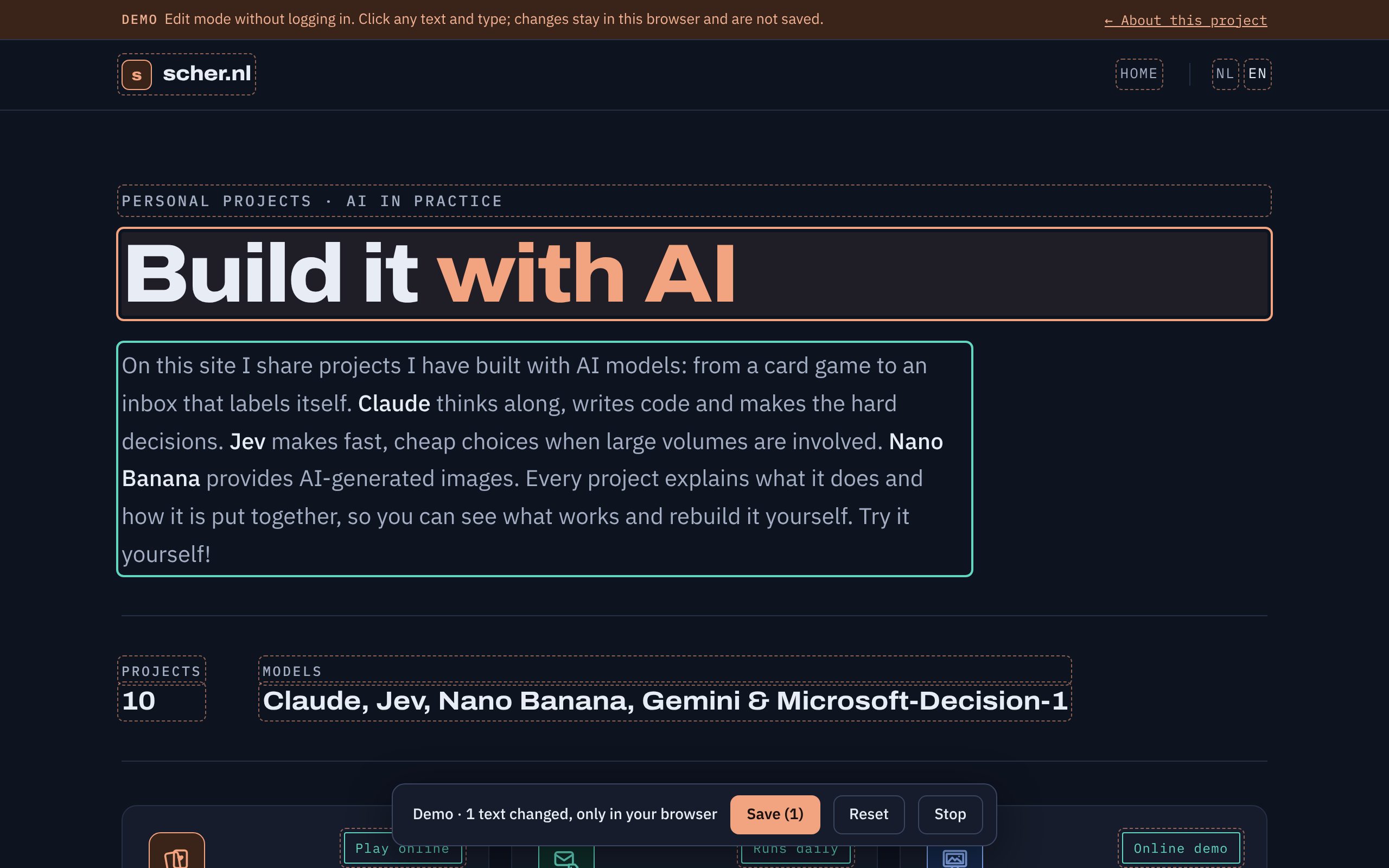
Editing on the page itself
Claude CodeOwnerAdd
?bewerkto the address of a page, and every visible text becomes clickable. You type over it, the changed texts light up, and Save writes only those texts to the text file. It works on every page and in both languages, with the same login as the CMS. For texts you cannot see, such as the page title or texts inside a figure, the CMS remains the place.After step 3In the CMS you edit fields away from the page, and have to work out which field belongs to which sentence.ImprovementWhat you see is what you edit, exactly where it sits. No more searching, and you see straight away how it looks.?bewerksame login as /adminchanged texts only
The Claude API
The translation in step 2 runs through the Claude API: access to Claude for programs rather than for people. On every push, the GitHub Action sends one request per page with the changed Dutch texts, plus the existing English texts as context, so terms and tone stay consistent. Claude (Sonnet 5.5) replies in a fixed format: exactly one English translation per text. That reply first passes the HTML filter and only then goes into the site.
There is no human at the wheel in this step. The Action uses an API key that is stored as a secret in GitHub and is only available in the translation step. Usage is billed per request, separately from the Claude subscription, and it has a spending limit.
| Aspect | Claude app (desktop) | Claude API |
|---|---|---|
| Who it is for | A person who chats, writes or builds | A program, such as a GitHub Action |
| How it starts | You type a question | Automatically, on every push |
| Without you | No, someone has to ask | Yes, also after a change in the CMS or with ?bewerk |
| Reply | Free text in a conversation | Fixed format that code checks and processes directly |
| Predictable | Each conversation a little different | The same instructions and the same model every time |
| Cost | Fixed monthly amount (subscription) | Per use, with a spending limit |
| Strong at | Thinking along and building, like this site with Claude Code | Recurring work in a build pipeline |
Why the API here
- Translating has to happen without anyone doing anything. A text from the CMS or edit mode arrives as a commit, and the Action runs on a GitHub server, where there is no Claude app.
- The translation goes into the site without anyone in between. So the reply needs a fixed format that code can check, rather than a chat message.
- Every translation follows the same fixed rules: keep HTML tags, link to the English pages, do not translate proper names. That makes the result predictable every time.
- Only changed texts go to Claude, so usage per change is small, and it can be traced per request.
- The Claude app remains the tool for building and improving the site. The API handles the automatic part behind it.
Then and now
| Task | Before | Now |
|---|---|---|
| Changing a sentence | Open two HTML files and search between the tags | Click on the page and type |
| English version | Translate and enter it yourself | Claude translates on every change |
| Where | A computer with the code, or a prompt to Claude Code | Any browser, on a phone too |
| Risk of a broken page | A forgotten tag breaks the layout | Layout is separate; the build checks every text |
| New page | Keep texts in two languages up to date by hand | Shows up in the CMS and edit mode automatically |
The demo
The demo is the same edit mode, with ?bewerk=demo in the address. Only saving does nothing: there is no login and no connection to GitHub, even if the owner is logged in in the same browser.
main is live within two minutes. Writing therefore requires a GitHub login with rights to this one repository.